AutoXPP — D365 F&O Autonomous AI Dev Engine
See Pricing How It Works

Watch AutoXPP in Action

AutoXPP™ is a professional-grade autonomous execution engine for X++ development. It analyzes requirements, reviews designs, generates code, builds, tests, and iterates — deterministically, inside your IDE.

This is the same discipline experienced architects enforce manually — now executed autonomously.

What AutoXPP Does

An autonomous runtime that handles the full development loop

Requirement Analysis

Decomposes requirements into structured development tasks with dependency ordering. Pulls from Azure DevOps tickets or free-text descriptions.

Design Review

Evaluates implementation approach against D365 patterns before code is written. Catches anti-patterns and wrong API choices early.

Code Generation

Generates production-ready X++ code, metadata artifacts, labels, and security configurations following D365 naming conventions and extension patterns.

Build & Deploy

Compiles in Visual Studio, synchronizes the database, and deploys to your connected environment. Handles status polling and error recovery automatically.

Test Validation

Generates test cases from the requirement, seeds test data, and executes structured tests against the live environment with evidence capture and pass/fail reporting.

Autonomous Correction

When tests fail, diagnoses the root cause from test evidence, applies the fix, rebuilds, and retests. Repeats until all tests pass or escalates when stuck.
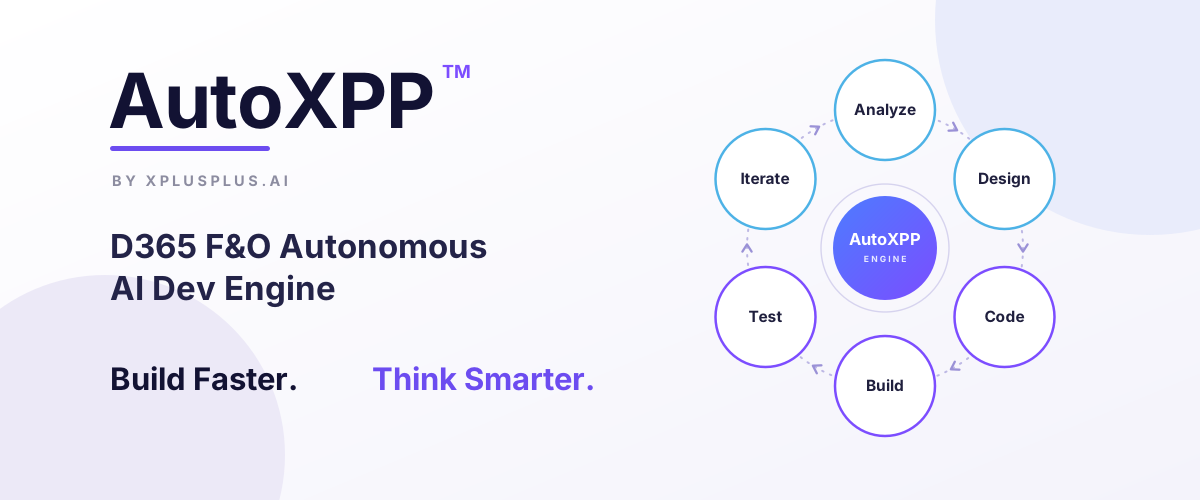
The Autonomous Loop

Deterministic orchestration, not guesswork

Analyze
Design
Code
Build
Test
Iterate

Repeat until validation passes. No manual intervention required.

Engine Capabilities

What the autonomous runtime includes

IDE-Native Execution

Runs directly in your development environment. No cloud dependency for the execution loop.

D365 F&O Pattern Library

Built-in knowledge of standard patterns, naming conventions, and extension design.

Deterministic Orchestration

Explicit decision trees and quality gates, not probabilistic guessing.

Built for Claude Code

Optimized for the Claude Code CLI.

Continuously Improved

Engine capabilities grow with each update.

Marketplace Plugin Delivery

Install and configure in minutes.

How It Works

Three steps to autonomous X++ development

1

Subscribe

Choose your plan and install the AutoXPP plugin

2

Configure

Connect to your D365 F&O workspace

3

Execute

Describe your requirement and let the engine handle the rest

How AI Is Guided in Real X++ Projects

See how AutoXPP applies structured guidance to real D365 F&O development scenarios

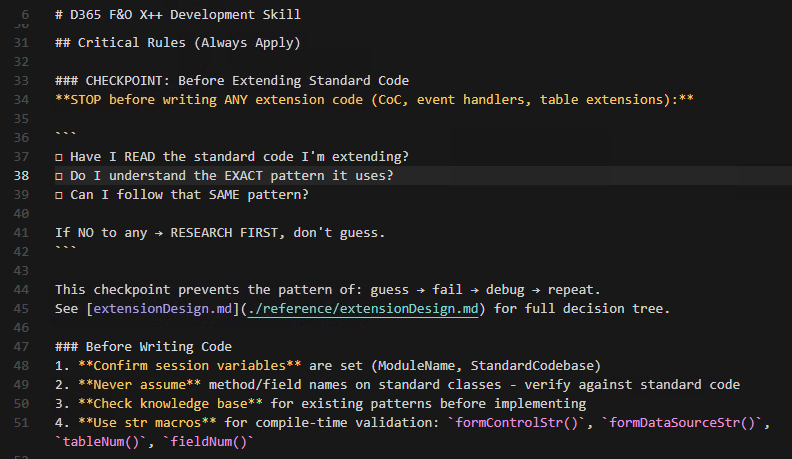
Enforced development guardrails
Quality Gates

Enforced Development Guardrails

Agents pause before extending standard code, verify understanding of existing patterns, and follow standard implementations whenever possible. This prevents the common loop of guess-fail-debug-repeat.

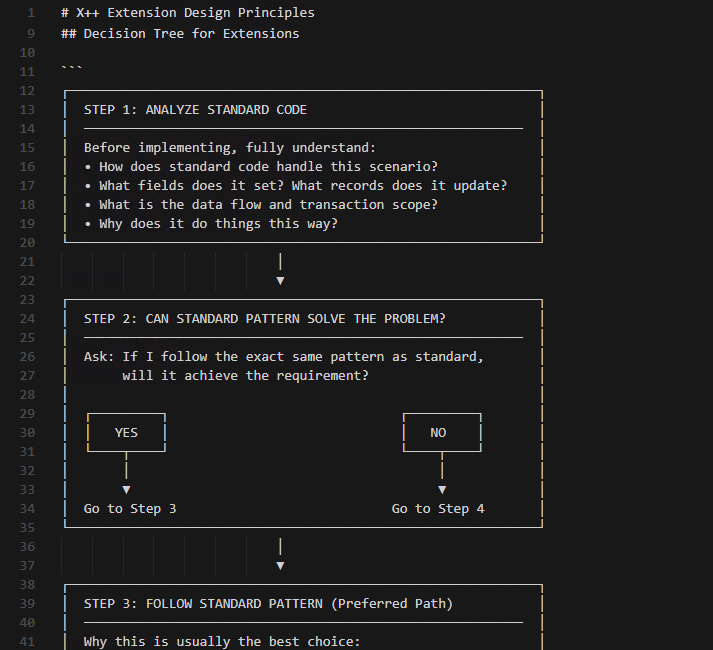
Extension decision logic
Best Practices

Extension Decision Logic

AI agents analyze how standard code handles scenarios, whether standard patterns already solve the problem, and when deviations are justified. This ensures extensions align with Microsoft-recommended practices.

AutoXPP-enabled AI coding
Smart Detection

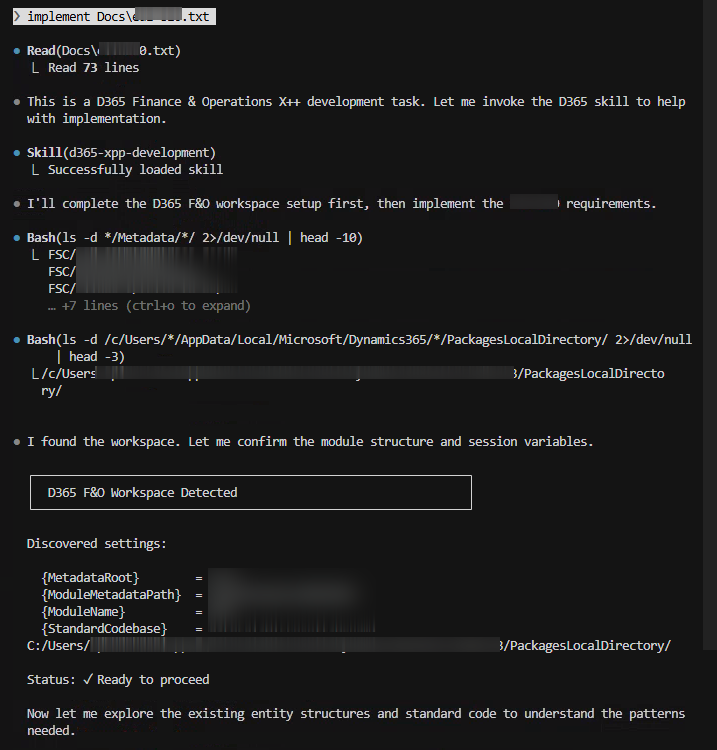
AutoXPP-Enabled AI Coding

When enabled, AI agents detect the D365 F&O workspace structure, confirm required session variables, and apply engine guidance before generating or modifying code. This results in more accurate, context-aware X++ output.

Error diagnosis workflow
AI Workflows

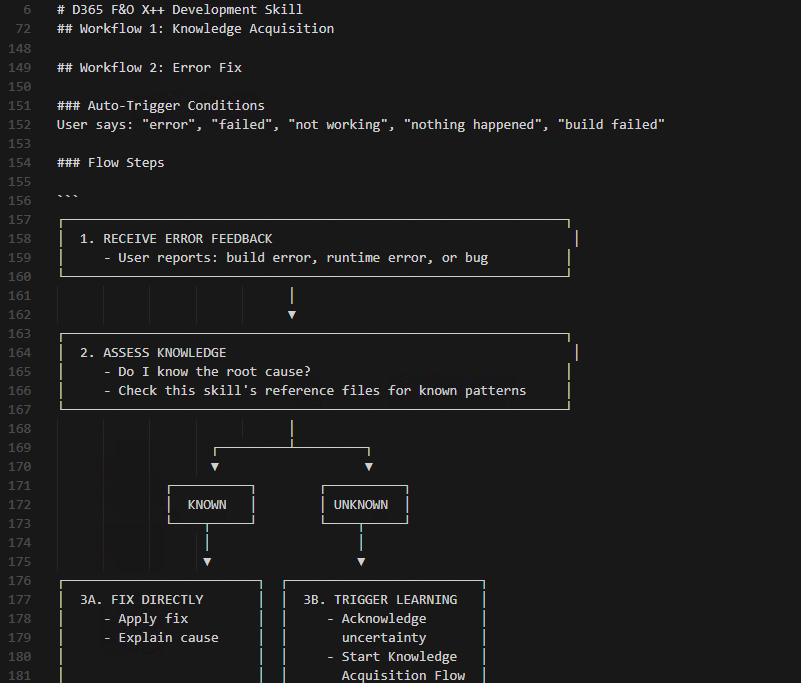
Error Diagnosis and Fix Workflow

Agents follow structured flows to assess whether root causes are known, apply fixes directly when patterns exist, and trigger knowledge acquisition when uncertainty remains. This avoids hallucinated fixes.

These examples represent real AutoXPP engine behavior during D365 F&O development sessions.

× Full size image

AutoXPP in Action

Real AI-generated X++ from production projects. Click to see the code.

Can it handle GL journal posting?
Debit/credit journal with LedgerJournalEngine, dimensions, and auto-posting
Creates and posts a GL journal for equipment damage repair costs. Journal name and accounts are parameter-driven — never hardcoded.

            
LedgerJournalName::find() NumberSeq::newGetVoucherFromId() LedgerJournalCheckPost ttsbegin/ttscommit
Generated by AutoXPP from a natural-language rental management requirement
Can it handle inventory with concurrency safety?
Equipment checkout with selectForUpdate, serial tracking, and state machine validation
Checks out rental equipment with pessimistic locking. Validates agreement status, locks the serial number row before checking availability, and transitions both equipment and agreement state atomically.

            
select forUpdate Double-check pattern Multi-table atomic update State machine transitions
Generated by AutoXPP from a natural-language rental management requirement
Can it handle periodic billing with proration?
Batch billing engine with partial period calculation and while-select joins
Calculates rental charges for all active agreements. Handles daily and weekly rates, prorates partial weeks at the daily rate, and tracks last-billed dates to prevent double-billing.

            
while select ... join Last-billed tracking Weekly proration Container-packed return
Generated by AutoXPP from a natural-language rental management requirement
Can it handle multi-concern returns with GL posting?
Equipment return with damage handling, inventory state, agreement completion, and GL journal
Processes equipment return with optional damage flag. Updates inventory tracking, transitions agreement line/header state, auto-completes the agreement when all lines are returned, and posts a GL damage journal in a separate transaction scope.

            
Separate tts scope for GL select firstonly completion check Branched state transitions Cross-class delegation
Generated by AutoXPP from a natural-language rental management requirement
Can it handle deep SCM internals — InventTrans, cross-company, dimensions?
Inbound receipt processor — per-batch transfer order receipt with InventDim splitting and intercompany posting
The hardest class AutoXPP has built. Receives transfer orders per-batch, splits InventTrans when source and destination warehouses have different dimension configurations, and posts intercompany packing slips — all atomically. These two excerpts show the core complexity: dimension resolution and batch splitting.
Excerpt A: Per-batch InventDim resolution for TO receipt

            
Excerpt B: Pre-register receive InventTrans with batch splitting

            
InventTransOrigin chain InventDim::findOrCreate() Per-batch InventTrans splitting doInsert() for raw insert Map/MapIterator batch grouping
Generated by AutoXPP for a production integration — 20+ iterations across build/test/fix cycles
Does AI know X++ extension patterns?
Table Data Event Handlers, Chain of Command (CoC), and standard Microsoft extension mechanisms
Two standard D365 extension patterns every F&O developer uses daily. AutoXPP generates both correctly — proper attributes, next keyword placement, and extension class structure.
Table Data Event Handler — Default field values from master data

            
Chain of Command — Business rule validation on SalesTable

            
DataEventHandler attribute ExtensionOf attribute next keyword (CoC) tableStr() intrinsic
Standard Microsoft extension patterns — generated correctly by AutoXPP

Simple, Transparent Pricing

No hidden costs. Cancel anytime.

Loading plans...

Start Building Autonomously

Describe the requirement. AutoXPP handles the rest.

Subscribe Now

Questions? contact@xplusplus.ai