MCP Setup Guide
fo-semantic-mcp Setup for Antigravity
Configure the MCP server with Google's Antigravity IDE
About Google Antigravity
Google Antigravity is an agentic development platform built on VS Code, powered by Gemini 3 Pro. It combines a familiar coding experience with an agent-first interface, allowing you to deploy AI agents that autonomously plan, execute, and verify complex tasks.
Antigravity supports the Model Context Protocol (MCP), enabling fo-semantic-mcp to provide D365 F&O artifact search capabilities directly in your development workflow.
HTTP Transport for MCP
Antigravity connects to MCP servers via HTTP transport. fo-semantic-mcp provides a hosted endpoint at https://mcp.xplusplus.ai/mcp - no local installation required.
Configuration Steps
-
Get Your API Key
Sign in to xplusplus.ai and get your API key from the dashboard.
Get API Key -
Open MCP Settings in Antigravity
In Antigravity IDE, navigate to Settings and find the MCP Servers configuration section.
-
Add the MCP Server Configuration
Add the following JSON configuration to connect fo-semantic-mcp:
{ "mcpServers": { "fo-semantic": { "serverUrl": "https://mcp.xplusplus.ai/mcp", "headers": { "X-API-Key": "your_api_key_here", "X-FO-Local-Assets-Path": "C:\\Users\\YourName\\AppData\\Local\\Microsoft\\Dynamics365\\10.0.xxxx\\PackagesLocalDirectory", "X-FO-Search-Default-Limit": "10", "X-FO-Search-Default-Threshold": "0.7", "Content-Type": "application/json" } } } }Configuration Headers
X-API-Key (required) - Your API key from xplusplus.ai
X-FO-Local-Assets-Path (recommended) - Path to your local F&O PackagesLocalDirectory for XML file reading
X-FO-Search-Default-Limit - Number of search results (default: 10)
X-FO-Search-Default-Threshold - Relevance threshold 0-1 (default: 0.5) -
Save and Activate
Save the configuration. Antigravity will connect to the MCP server automatically.
-
Test the Connection
Try asking Antigravity to search for F&O artifacts:
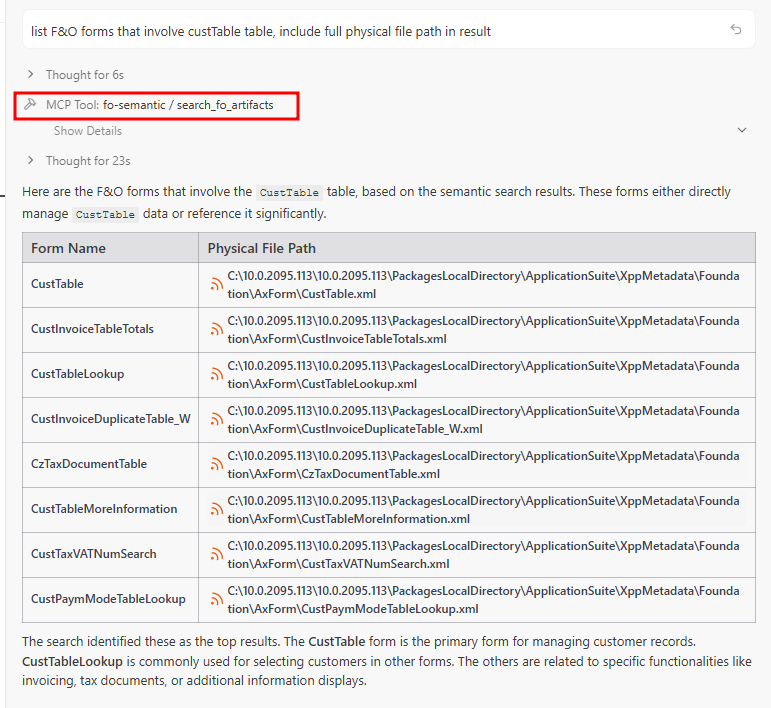
List F&O forms that involve CustTable table, include full physical file path in result
Example in Action
Here's what it looks like when Antigravity uses the MCP server to find F&O forms related to CustTable:
What's Happening
When you ask about F&O artifacts, Antigravity's AI agent automatically invokes the MCP server's search_fo_artifacts function via HTTP. The server queries the xplusplus.ai artifact index and returns matching results with their local file paths based on your configured PackagesLocalDirectory.
Finding Your PackagesLocalDirectory
To enable local XML file reading, set the X-FO-Local-Assets-Path header to your F&O installation path:
Typical Windows path:
PowerShell command to find it:
Note: Use double backslashes (\\) in the JSON configuration for Windows paths.
HTTP vs Stdio Transport
fo-semantic-mcp supports two connection modes:
| Feature | HTTP (Antigravity) | Stdio (Cursor/Codex) |
|---|---|---|
| Connection | HTTPS to mcp.xplusplus.ai | Local npx process |
| Config Format | JSON with headers | JSON/TOML with env vars |
| API Key Location | X-API-Key header | FOINDEX_API_KEY env |
| Local Node.js Required | No | Yes |
Troubleshooting
Connection failed?
- Verify the serverUrl is exactly
https://mcp.xplusplus.ai/mcp - Check your API key is correct and active
- Ensure Content-Type header is set to
application/json
No results returned?
- Try lowering the X-FO-Search-Default-Threshold value (e.g., 0.5)
- Check your API key has available quota
- Try a simpler search query
File paths not showing?
- Make sure X-FO-Local-Assets-Path is set correctly
- Use double backslashes for Windows paths in JSON
- Verify the PackagesLocalDirectory exists at that path
Ready to Start?
Get your API key and start using AI-assisted F&O development with Google Antigravity